James Leighton

How to Show Your Toggl Time Tracking Live on Your Blog (with Flask)

If you use Toggl to track your time and want to show that activity live on your own website, here is how I did it with a small Flask app. It pulls my recent reading, gaming and board gaming entries straight from the Toggl API, caches them for speed, and drops them onto my homepage through a simple JavaScript widget. The same setup also syncs my Toggl entries into Exist.io, so I have covered both below.

Everything here runs on a free PythonAnywhere account and a Β£1.20 a month VPS, so it is cheap to keep going, and the code is yours to take.

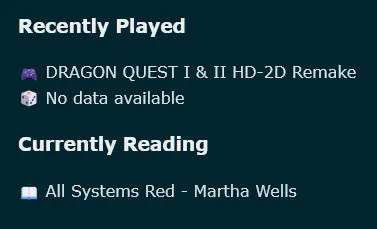
A small line of text on my homepage showing my most recent tracked activity, pulled live from Toggl

How it works

There is a Flask app with three endpoints, one each for gaming, reading and board gaming. Each one asks Toggl for my latest entry in that project and returns its description as plain text. The results are cached for six hours, so page views are not constantly hitting Toggl, and when it does fetch something new it also pings a Discord webhook so I get a little notification. A scrap of JavaScript on my blog then reads those endpoints and writes the text into the page.

No database, no framework beyond Flask, nothing to babysit.

The Flask app

Here is the whole thing. Fill in API_TOKEN and WEBHOOK_URL with your own, keep them out of any public repo, and set the three project IDs in PROJECTS to match your Toggl projects.

from flask import Flask
from flask_cors import CORS
import requests
from requests.auth import HTTPBasicAuth
from datetime import datetime, timedelta
 
#Toggl API Key
API_TOKEN = ""
 
#Discord Webhook URL For Notifications
WEBHOOK_URL = ""
 
 
# Map endpoint names β†’ toggl project IDs
PROJECTS = {
    "Gaming": 1234,
    "Reading": 5678,
    "Board Gaming": 9876,
}
 
 
app = Flask(__name__)
CORS(app)
 
# Cache structure:
# {
#   "project1": {"description": "...", "timestamp": datetime(...)},
#   "project2": {...},
#   ...
# }
cache = {}
 
#Do not fetch new data unless it is older than this
CACHE_DURATION = timedelta(minutes=360)
 
 
def fetch_latest_description(project_id):
    """Fetch the latest Toggl entry for a specific project."""
    url = "https://api.track.toggl.com/api/v9/me/time_entries"
    response = requests.get(url, auth=HTTPBasicAuth(API_TOKEN, "api_token"))
 
    if response.status_code != 200:
        return None
 
    entries = response.json()
    project_entries = [e for e in entries if e.get("project_id") == project_id]
 
    if not project_entries:
        return None
 
    latest = sorted(project_entries, key=lambda x: x["start"], reverse=True)[0]
    return latest.get("description", "No description available")
 
 
def get_description_for(project_key):
    """Return cached or freshly fetched description for a project."""
    project_id = PROJECTS[project_key]
    now = datetime.utcnow()
 
    # Check cache
    if project_key in cache:
        cached = cache[project_key]
        if now - cached["timestamp"] < CACHE_DURATION:
            print ("Cache Hit! %s " % cached["description"])
            return cached["description"]
 
    # Cache expired or missing β†’ fetch fresh
    print ("Cache Miss! Hitting Toggl")
    desc = fetch_latest_description(project_id)
    if desc is not None:
        cache[project_key] = {
            "description": desc,
            "timestamp": now
        }
 
        print (desc)
        response = requests.post(WEBHOOK_URL, data={"content": str(desc)})
 
        print("Discord Status code:", response.status_code)
        print("Discord Response:", response.text)
 
 
        return desc
 
    # If fetch failed but cache exists, return stale cache
    if project_key in cache:
        return cache[project_key]["description"]
 
    return "No data available"
 
 
# --- Three endpoints ---
@app.route("/gaming")
def project1():
    return get_description_for("Gaming")
 
 
@app.route("/reading")
def project2():
    return get_description_for("Reading")
 
 
@app.route("/board-gaming")
def project3():
    return get_description_for("Board Gaming")

A few things worth knowing.

Toggl's API uses your token as the username and the literal word api_token as the password. That is the HTTPBasicAuth(API_TOKEN, "api_token") line, and it catches everyone out the first time.

CORS(app) is doing quiet but essential work. Your blog and your Flask app live on different domains, so without it the browser blocks the request. That one line lets the page read the endpoints.

The cache falls back to stale data if a fetch fails, so a Toggl blip never shows a broken line to a reader. And the Discord webhook is optional: I like getting a ping when a new entry gets picked up, but you can strip that block out if you would rather not bother.

Showing it on Bear

A small piece of JavaScript on my blog calls the three endpoints and writes each result into the page. That lives in widget.js in the same repository, alongside the code above.

You can find both files on my Source.Tube account.

Hosting it cheaply

I run the widget on a free PythonAnywhere account, which has handled it without a hiccup for weeks. A free tier is plenty here: the app does almost nothing most of the time, and the six-hour cache means even a busy day barely touches Toggl.

If you would rather self-host, it will run happily on a Raspberry Pi, or on the same sort of cheap VPS I use for the Exist sync below (mine is about Β£1.20 a month with Ionos).

Bonus: syncing Toggl into Exist.io

The other half of my setup pushes my Toggl entries into Exist.io, so my time tracking feeds into the rest of my quantified-self data. I have tidied that code up too: it removes a lot of duplication and keeps API calls to a minimum.

The code lives in my Toggl2Exist repository. It runs fine on a Raspberry Pi, but I keep it on the cheap VPS mentioned above so it can run on a schedule without my machine being on.

And that is the whole setup: a few lines of Python, a scrap of JavaScript, and a live glimpse of what I am reading or playing sitting on the homepage.

#100DaysToOffload #How-to #Python #Quantified self